
 Any marketer knows that there are hundreds of social media tools being rolled out each and every month. They are developed to make the job of social media management easier for both the marketer and the client. However some of them simply clutter results and further complicate efforts to find statistics that matter to the boss and prove ROI to the client. ROI has been in question ever since social media became an integral part of the marketing world in the mid 2000's.
I’d be rich if I had a dime for every time I was asked, “Is it worth my time and money to have a social media presence?”
The answer to that question is yes.
To that point, choosing the wrong tools to help you in your social media efforts could cost you not only time and money, but ultimately, the trust of your clients and your boss.
We’ve decided to share with you some of the special sauce we use to ensure that we’re delivering results when their needed.
1. Social Media Image Maker | Check It Out!
This tool is one of my personal favorites. It’s simple and easy to use. With the ever changing social media landscape, it’s almost impossible to keep up with each and every image/logo size changes. Having this tool in your back pocket will allow you to make sure that you’re able adjust your images as needed and in a very timely manner. Let's face it, noone wants to have half of their logo cropped because of misinformation.
2. HubSpot Social Inbox
HubSpot’s social inbox is one of the best tools we’ve ever used when deploying social media campaigns. Not only does it allow you to schedule posts, but it also gives you the opportunity to track and follow results as it plugs directly into your contact list allowing you to interact with prospects and customers in real time.
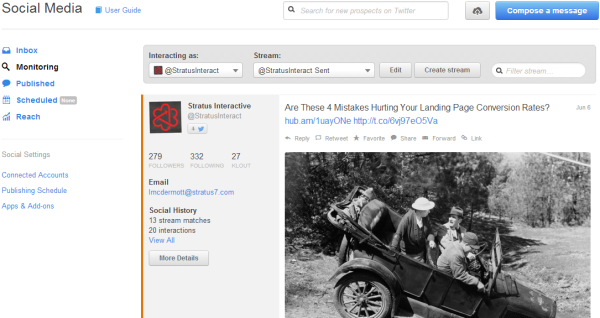
What makes HubSpot’s social inbox stand out against other social media tools is that it allows you to realize and prove ROI, something that many other companies have struggled to do in my opinion.
The color coded tweets ensure that you’re saying the right thing to the right people at the right point in time and you’ll be happy to know you can validate your social media efforts with high level data in regards to visits, contacts and customers. It’ll make you, your boss and your clients feel good about investing in social media.
3. Buffer And Hootsuite
Buffer and Hootsuite are two other great tools that social media managers use. Some people ask me why I choose to use both Buffer and Hootsuite. I’ll attempt to explain in the next paragraph.
Let me start by saying I am against the idea of posting weeks or even months’ worth of social media posts in one sitting. If I were to do it, I’d choose Buffer as it optimizes posting times based on results. The ease of scheduling multiple posts is evident right off the bat as you don’t need to fumble around with an excel spreadsheet to make it happen.
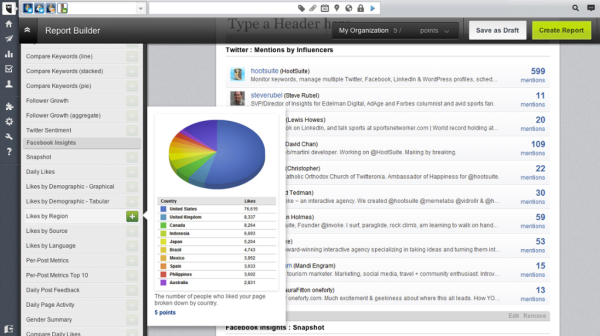
Hootsuite on the other hand, gives you the ability to dig deep in results and has a built in reporting mechanism that you can email straight to your boss or you client, saving tons of time in the process.
Both tools connect to multiple social networks and utilize multiple add-ons via browsers and share other similarities.

What are some tools you like to utilize alongside your social media strategy?